People and roles
Inviting people
Give your staff and bookkeeper their own login, with access to the companies they work in.
Everyone gets their own login, so you can see who made each invoice and switch someone off when they leave. Only Owners can invite people.
- Open User Management and choose New user.
- Fill in their Full name and Email (used to sign in).
- Choose their Role: Owner, Normal user, Order taker or Bookkeeper. See What each role can do.
- Under Company access, tick the companies they work in. Owners always have every company.
- Choose Add and send invite.
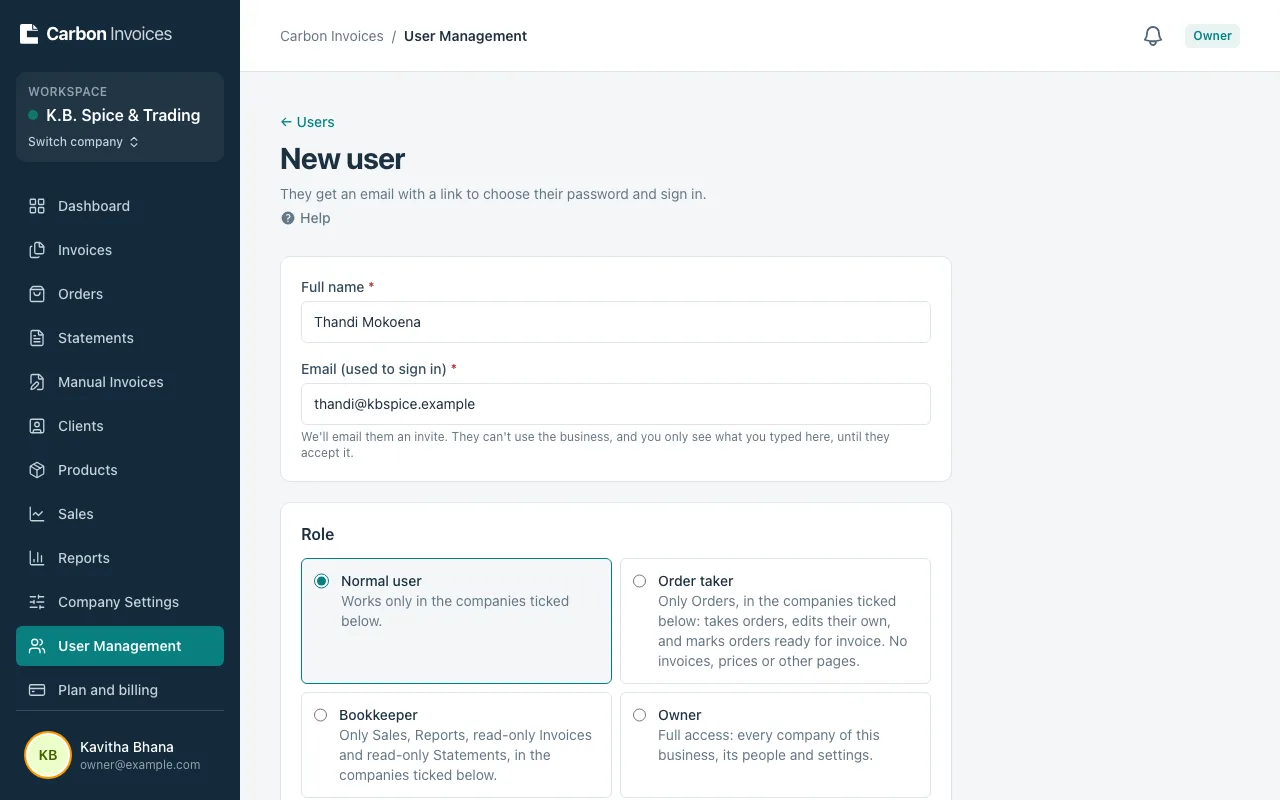
They get an email with a link to choose their password and sign in. The link lasts 7 days. If they have a Google account with the same email address, they can also sign in with Continue with Google.
Until they accept, they’re marked Invited: they can’t use the business, and you see only the name and email you typed.
How many people you can have
Your plan includes a number of users; bookkeepers don’t count. See Plans and limits.
Someone already has a Carbon Invoices login?
Invite them the same way; you won’t be told whether they already have a login. Their invite asks them to Join your business instead of choosing a password. Once they accept, they use one login for both businesses and pick which one to work in after signing in. Their password and details stay theirs: you can’t see or change them.
If their password or email was last set by an Owner of the other business rather than by them, they choose a new password when they accept, and the old one stops working.